ChatGPT prompt generator
To use the ChatGPT prompt generator, open the Build tab, keep the ChatGPT target and type your idea. Then answer one short question at a time. Each answer adds a line under a Markdown heading and raises a score out of 100. At 70, copy the prompt or press Open in ChatGPT.
By The Promptcairn team (Product and testing). Last updated .
Type your idea above. Then the builder asks one short question at a time, and every answer adds points.
- Task (missing)18
- Specific detail (missing)8
- Audience (missing)16
- Output format (missing)14
- Context (missing)12
- Constraints (missing)10
- Role (missing)8
- Example (missing)8
- Tone (missing)6
Your prompt
Your finished prompt appears here.
How to use the ChatGPT prompt generator, step by step
- First, open the Build tab and leave the target on ChatGPT.
- Then type your idea as one full sentence that starts with a verb.
- Next, answer each question with a chip or your own words, or press Skip.
- After that, watch the score and stop once it passes 70.
- Finally, press Copy prompt, or press Open in ChatGPT to start a new chat with it.
The first 3 runs each day are free. After that, see the pricing page for packs and plans, or read how we test the tool.
ChatGPT prompt generator tested with a real input
We ran our own test input through this exact tool. The text and the numbers below come from that run, so you can repeat it and compare.
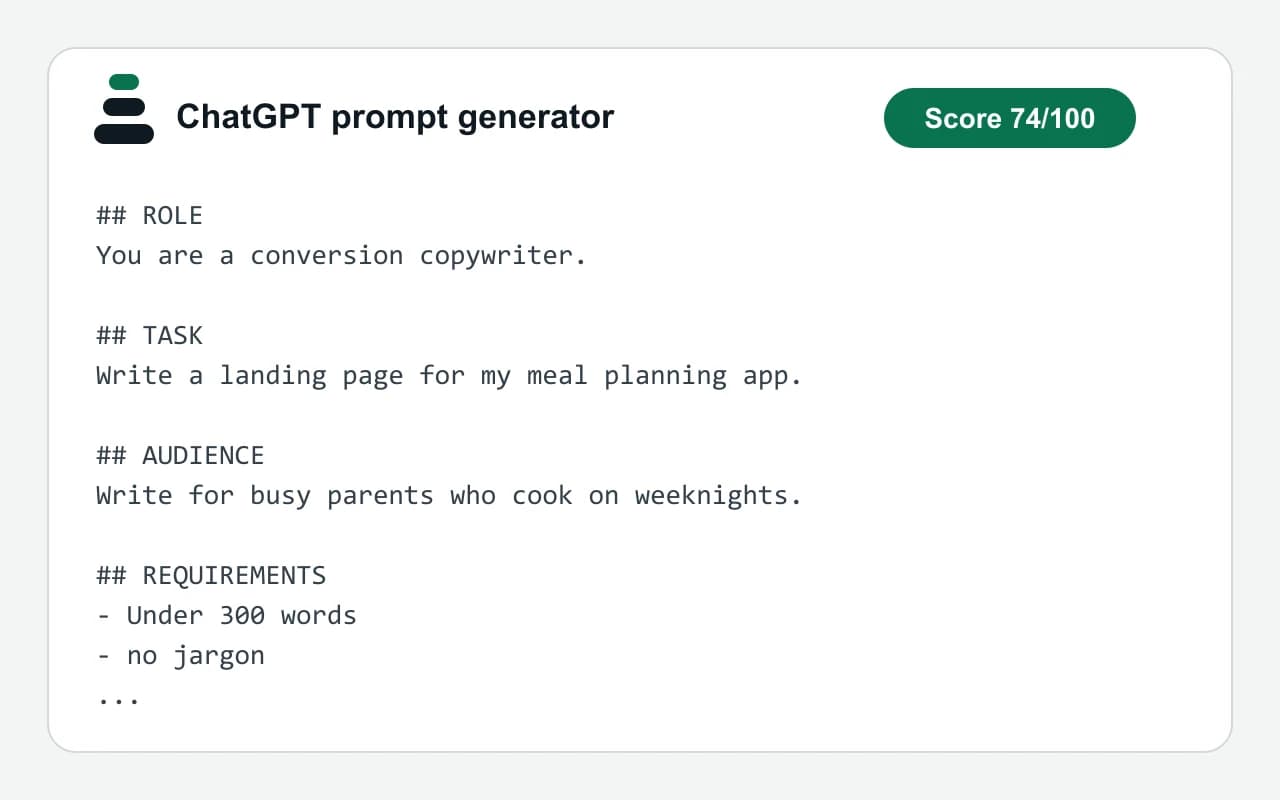
- Test input
- "Write a landing page for my meal planning app" plus 3 answers
- Output
- ChatGPT prompt
- Score from the idea alone
- 34
- Score after the answers
- 74
- Questions answered
- Audience, Output format, Constraints
- Prompt length
- 451 characters
- Time to build
- under 1 second
## ROLE
You are a conversion copywriter.

## TASK
Write a landing page for my meal planning app.

## AUDIENCE
Write for busy parents who cook on weeknights.

## REQUIREMENTS
- Under 300 words
- no jargon

## OUTPUT FORMAT
Three sections with headings, ending in one call to action.

## QUALITY BAR
- If a key detail is missing, state the assumption you made instead of guessing silently.
- Check the answer against every requirement before you finish.
How we test: every page has a fixed input, and we read each output by hand. More on the about page.
What the ChatGPT prompt generator adds to your idea
A bare request leaves the model guessing. So the builder asks for the parts people usually forget. For example, it asks who will read the answer and what shape the reply should take.
There are nine fields, and each one has a fixed weight. The task counts most, then the audience and the output format. Tone counts least. As a result, the score tells you which gap to close first.
The role often fills itself in. For instance, an idea about a landing page gets a conversion copywriter. The builder knows 14 task types like that. Still, you can replace the role with your own at any time.
Why the prompt uses Markdown headings
The finished text is split into labeled blocks: ROLE, TASK, AUDIENCE, CONTEXT, REQUIREMENTS, OUTPUT FORMAT, EXAMPLE and QUALITY BAR. Each block sits under its own Markdown heading. Therefore, the model can tell an instruction from background material.
OpenAI's prompt guide describes the same idea, because headings and delimiters mark where one part ends. The layout also helps you. For example, you can change the audience later without touching the task.
Every prompt ends with a short quality bar. First, it asks the model to state any assumption it made. Then it asks for a check against each requirement before the answer is done.
When this ChatGPT prompt generator is the wrong choice
No model writes the prompt here, so the wording is only as good as your answers. The builder arranges and scores them. However, it cannot know facts about your product, and it does not test the prompt in a chat.
A quick question does not need eight headings either. In that case, just ask ChatGPT directly. Also, if you already have a long draft, the Enhance tab is a better start, because it keeps your words and shows what is missing.
The nine fields and their weight in the score
| Field | Points out of 100 |
|---|---|
| Task | 18 |
| Audience | 16 |
| Output format | 14 |
| Context | 12 |
| Constraints | 10 |
| Specific detail (idea has 8 or more words) | 8 |
| Role | 8, filled in for 14 task types |
| Example | 8 |
| Tone | 6 |
| Good enough mark | 70 |
ChatGPT prompt generator FAQ
Is the ChatGPT prompt generator free to use?
Yes. The Build tab is free and unlimited, and you do not need an account. Only the Enhance, Screenshot and URL tabs have a daily free limit.
Does the ChatGPT prompt generator use AI to write my prompt?
No. The builder runs in your browser with fixed rules, so no model rewrites your words. Because of that, the idea you type there is not sent to our server.
What does the score out of 100 mean?
It shows how many of the nine fields your prompt covers, by weight. So a score of 70 means the main gaps are closed. It does not grade the quality of your writing.
What happens when I click Open in ChatGPT?
A new ChatGPT chat opens in another browser tab with your prompt in the message box. You still need your own ChatGPT account, because this site is not connected to OpenAI.
Do I have to answer every question?
No. Press Skip on anything that does not matter for your task. The prompt then leaves that block out, and the score simply stays lower.
Why does it say my idea is too vague?
The builder flags ideas under eight words, vague words such as stuff or nice, and a missing action verb. So add a verb and a concrete detail, and the note goes away.