Prompt enhancer
To use the prompt enhancer, open the Enhance tab, paste the prompt you already have and press Enhance prompt. Fixed rules then check which of seven fields your draft states. After that, they add a role and a quality bar, and they show the score before and after. Finally, you see the questions still open.
By The Promptcairn team (Product and testing). Last updated .
How to use the prompt enhancer, step by step
- First, open the Enhance tab and paste your draft, up to 2,000 characters.
- Then press Enhance prompt and read the score before and after.
- Next, check the Already there and Added lists to see what the rules found.
- After that, read the Still open line, because it lists each missing field with its points.
- Finally, press Keep improving in the builder and answer those questions one at a time.
The first 3 runs each day are free. After that, see the pricing page for packs and plans, or read how we test the tool.
Prompt enhancer tested with a real input
We ran our own test input through this exact tool. The text and the numbers below come from that run, so you can repeat it and compare.
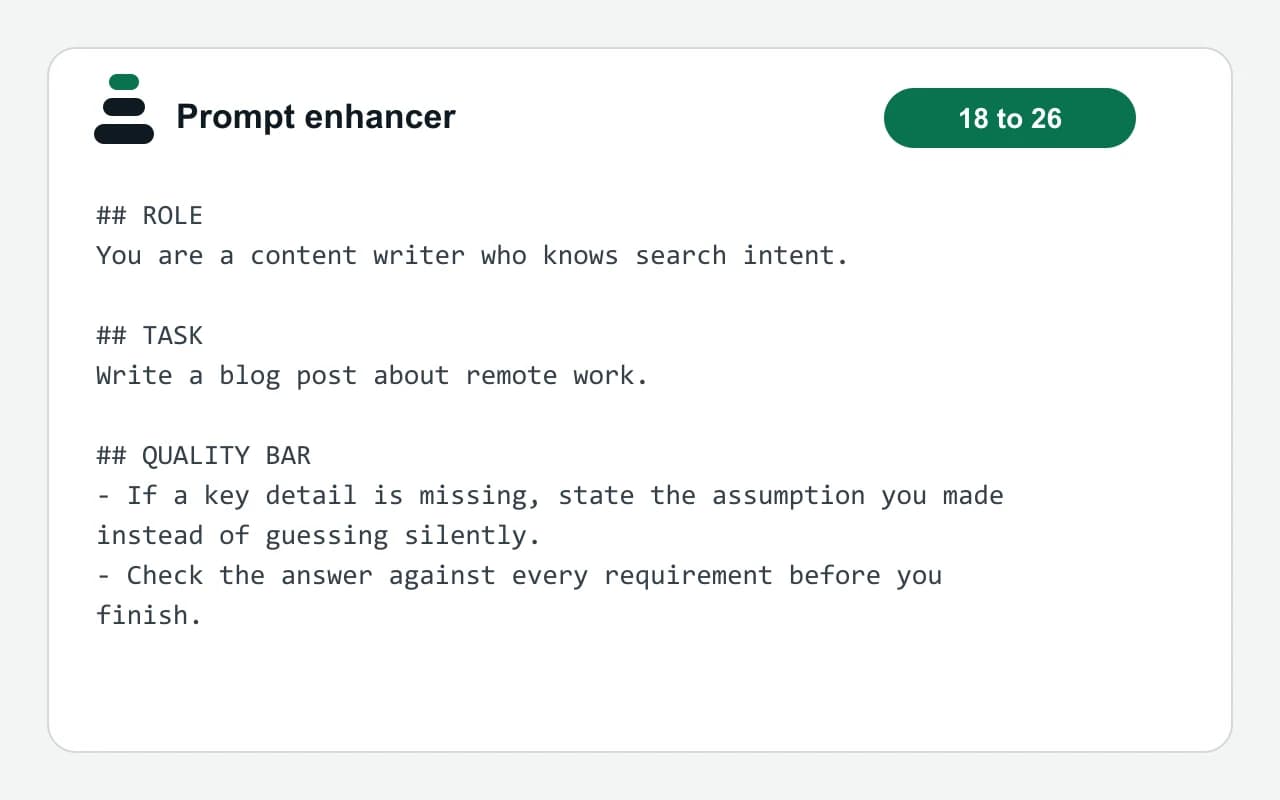
- Test input
- "write a blog post about remote work"
- Output
- Enhanced prompt (rules only)
- Score before
- 18
- Score after
- 26
- Added
- Role, Quality bar
- Still open
- Audience, Output format, Context, Constraints, Example, Tone
- Time to build
- under 1 second
## ROLE
You are a content writer who knows search intent.

## TASK
Write a blog post about remote work.

## QUALITY BAR
- If a key detail is missing, state the assumption you made instead of guessing silently.
- Check the answer against every requirement before you finish.
How we test: every page has a fixed input, and we read each output by hand. More on the about page.
What the prompt enhancer checks in your draft
The rules look for seven fields. These are role, audience, output format, context, constraints, example and tone. Your own words stay in place as the task, so nothing you wrote is thrown away.
Next, the rules add two things. First, they add a role when the task implies one. For example, a landing page task gets a conversion copywriter. Then they add a fixed two-line quality bar. It asks the model to state its assumptions and to check the requirements.
Finally, you get a score out of 100 with fixed weights. The task counts for 18 points, and the audience counts for 16. Therefore, the same draft always gets the same score.
Why this AI prompt enhancer does not rewrite your text
This AI prompt enhancer is rule-based. So no model rewrites your prompt, and the result says that in plain words. We chose this because a rewrite can sound better while it guesses facts you never gave.
However, that honesty has a cost. The rules alone add few points, because they cannot know your reader or your goal. In contrast, the open questions carry most of the score. For instance, audience and output format are worth 30 points together.
So the largest gains come from your answers. The builder asks one short question at a time, and each answer becomes a line of the prompt. At 70 points, it tells you the prompt is good enough.
When a prompt enhancer is the wrong tool
First, skip it if you have no draft yet. In that case, start in the Build tab, which is free and unlimited. Enhance runs on the server, so it has a daily free limit and then needs credits.
It also checks text prompts only. For an image or a video prompt, the builder has its own fields, such as style, lighting and camera. Similarly, it cannot judge whether your facts are right. It only shows which parts of a prompt are present and which are still missing.
Fields and fixed weights behind the score
| Field | Points and how it is filled |
|---|---|
| Task | 18 points. Your pasted words are kept as the task |
| Specific detail | 8 points when the task has 8 or more words |
| Audience | 16 points. Detected, or left as an open question |
| Output format | 14 points. Detected, or left as an open question |
| Context | 12 points. Detected, or left as an open question |
| Constraints | 10 points. Detected, or left as an open question |
| Role | 8 points. Added by the rules when the task implies one of 14 task types |
| Example | 8 points. Detected, or left as an open question |
| Tone | 6 points. Detected, or left as an open question |
| Draft length | Up to 2,000 characters |
Prompt enhancer FAQ
Is the prompt enhancer free?
You get a daily free limit, and after that it needs credits. However, the Build and Ideas tabs stay free and unlimited.
Does the prompt enhancer use AI to rewrite my prompt?
No. Fixed rules detect fields, add a role and add a quality bar. So your wording stays as the task.
Why did my score only go up a little?
The rules can only add a role and the quality bar. Therefore, most points wait in the open questions, such as audience and output format. Answer them in the builder to raise the score.
Can I enhance a prompt for ChatGPT or Claude?
Yes. The result is a text prompt for a chat model. In the builder, you can also switch between Markdown headings for ChatGPT and XML tags for Claude.
What is a good prompt score?
The builder calls a prompt good enough at 70 out of 100. Still, the score only counts which fields are present, so read the prompt before you send it.
How long can my prompt be?
You can paste up to 2,000 characters. For a longer prompt, paste the core task first and then add the rest in the builder.